Showing posts with label productivity hacks. Show all posts

Wednesday, December 17, 2014

Takeaways: The Healthy Programmer

I recently picked up The Healthy Programmer by Joe Kutner. The 8+ hours of programming are beginning to take their toll on my health with various headaches/eyeaches, so I wanted to see if Joe had any insights into what I can do to stay healthy. Here are my key take-aways from Joe's book:

Walk Walk and Walk Some More

One of the big points that Joe stresses is the importance of walking. He tears through the current "standing desk" fad sweeping through the nation. Numerous studies can be cited which state that standing for 8 hours a day can be as bad for you as sitting 8 hours a day, albeit in different ways. The best thing we can do for our bodies is to take frequent breaks in which we walk. Walking gets the heart pumping, which is the source of the health benefits associated with walking. 

Walking is also associated with better cognitive function. We learn and remember things better while walking, which is extremely important for programmers. 

There are three areas of improvement I drew from the Healthy Programmer:
  1. If you get stuck on a difficult problem, take a walk. Walking will jog the brain and help it get out of its current rut of thinking.
  2. Take a walk either before or after learning something new. This will help you remember it better.
  3. Take a quick walk every 25 minutes. 
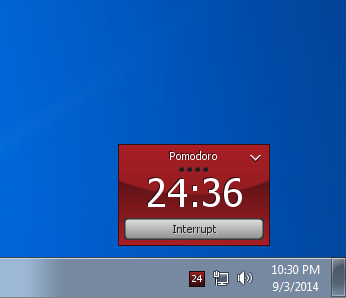
For that last bullet point, take advantage of the Pomodoro Technique. There is a Pomodoro Timer is available for Mac and Windows. I installed it on my work computer, and it looks like this:

You can set that little popup to always hover on your screen, and it alerts you when time runs out. When you get the alert, simply get up, walk around for a few minutes, look outside the window (to rest your eyes), and then reset the timer and get back to work. Using this technique will have remarkable effects on your health, and it will significantly lower your mental fatigue and increase your productivity.

Take care of your eyes

Imagine not having your eyes. It's a terrifying thought. Taking care of your eyes is important, and as programmers, we're already at a disadvantage because we stare at screens for 8+ hours a day. 

The Pomodoro Technique described above is a good way of giving your eyes the rest they need. Everyone knows they're supposed to rest their eyes and look in the distance every 15 or so minutes, but when you're in the middle of tracking down that obscure bug, an hour or several hours can go by before you remember to look up. The Pomodoro Timer is a good way of forcing yourself to look up and away more often. 

If you think there's a productivity cost, think about how productive you would be if you lost your eyesight. Your body is important. Take care of it. 

In addition to the technique above, I've also put a post-it note on my monitor with the message: "BLINK!" People tend to blink less while staring at a computer screen, so every time I see this note, I stop what I'm doing and blink several times for a few seconds. 

I've also lowered the contrast and brightness of my monitor so that it matches the brightness of my office. I've also put the display settings to "warm" - per Joe, red hues are better for the eyes than blues. 

Visualize breaking bad habits

Imagine yourself breaking through your bad habits. For example, if you know you go to the vending machine for chocolate at noon everyday, and you've decided you're going to stop doing that, then visualize several times over the course of the morning how you're going to not go to the vending machine at noon. If it helps, visualize yourself doing something else at noon - maybe going to the water cooler, or going to a coworker's cubicle, and then do that other thing. Once you've done it a few times, your chocolate urge will be significantly lower come 12PM.

Life should be a series of small improvements

I loved this point. "Set a new personal record everyday," says Joe. In many many small incremental improvements, we can make dramatic improvements in our lifestyles over the course of weeks, months, and years. Think about your daily routine. Is there something small you could do that would improve it? Seize that thing and fix it. Spend a few days making sure it's stamped out. Then pick on the next thing you want to improve and repeat.


I do recommend picking up the book I got these tips from - The Healthy Programmer (disclaimer: affiliate URL). It's not the best book in the world (it doesn't claim to be), but it does have some valuable nuggets of information that make it worth the time and energy spent reading it.

Wednesday, October 1, 2014

Creating simple logging "apps" with Google Forms


If you want to improve something, you've got to measure it first. Putting numbers on things helps us tame the wild waters of instinct and gut feeling. It helps us break things down and make them easy to understand. Numbers help us improve.

I've often felt the urge to create a means of recording something or the other in my life, and when I've had this urge, I've often fantasized about whipping out my Eclipse instance and putting together wonderful Android app that lets me record that thing and has a few dozen bells and whistles to boot. Of course, this never gets done, since I've never needed to record anything badly enough to create a dedicated app for it.

Recently though, I discovered a lovely shortcut to doing this, using Google Forms. I'm going to describe how to do that in this blog post. I mentioned in another article several ideas to help productivity. One of these was a recording what you eat and correlating productivity with it, so I chose that as my initial logging "app"/webpage.

Here's what the final result looks like:


This allows me to enter what I ate for dinner, breakfast, and lunch, and then in a 1-5 scale, rate how productive I felt at work and at home. The real trick was to keep the form simple. Once I conceived the idea of making this form, I wanted to add all sorts of bells and whistles - for example, if I wanted to track productivity, shouldn't I look at other major indicators? Maybe I should have a field for sleep, and another for any snacks that I ate. What if there were extenuating circumstances, like a friend visiting from out of state?

In the end I decided to include a catch-all "notes" field at the end of the form (not shown in the screenshot). I knew that if I made it too complicated, it would just be an excuse for me to procrastinate from filling it out at the end of the day when I'm tired anyway.

How to create the form

Step 1: Go to Google Forms and create a forms with the fields you want. In my example, I used type "text" for the breakfast/lunch/dinner fields, type "scale" for the rating fields, and type "paragraph text" for the notes field. This is what my "dinner" field looks like: 


Step 2: Make sure multiple responses per person are allowed in the form settings on the top of the page. 


Step 3: Go to File > Send Form. This will allow you to get the link to the form.


How to add the form to your phone

Step 4:  Copy the link and send it to your phone. You could just email it to yourself if you don't have a better way of doing it. 

Step 5: Open the link on your phone. On my Android phone, Chrome has the option to "Add to Homescreen":


If you tap that option, the OS will add an icon representing this form to your home screen. You can tap the icon, and it will open up your browser of choice with the form loaded! 

So there you have it - using this technique, you can make what is essentially a quick "App" to record any data you might want to on a daily or weekly basis in a convenient way using Google Forms. Whenever you want to check out your responses, and data logged so far, just log into your Google Drive, open up the form, and hit the View Responses button:


It might not be as neatly executed as a real app, but it will get the job done, and you can do it in five minutes, instead of spending hours coding an app!

Drop me a comment, letting me know what you use this technique for. :)

Monday, September 22, 2014

Working Better

For as long as I can remember, I've had Gmail, Google Voice and Google Calendar tabs perpetually open in my browser. However, after reading this article on Working Better by Paul Jarvis, I've decided to close the Gmail and Google Voice tabs in order to "Turn off every notification."

This is a difficult decision to make because a lot of my friends and some close family are long-distance at the moment, and removing these tabs is going to make me significantly less responsive to their texts and emails.

I'm also experimenting with making my browser full-screen when working on the internet, in order to allow for better focus. The result is interesting because the browser tends to look more like an app when doing this - one of the things I loathe the most about the app-based mobile ecosystem is the inability to run apps side-by-side - but I do think that it has been helping me.

The other suggestion that I really like is, "Keep a log of what you eat during the day and how you feel afterwards." I don't think I'll be able to implement this one just yet, but it's something I definitely want to plan towards in the long run. As I've aged, I'm discovering more and more the impact that small, everyday things like the food I eat has on my health and comfort.

I'm not sure how to approach this subject because of the sheer amount of misinformation available in the food and nutrition space. One thing I've been thinking of doing is to start having a "salad lunch" day once a week to get some fibre going through my system.

If you have time, give the article a read. It's a quick and simple read, and well worth the time.